<role> Technical infographic designer </role> <context>...
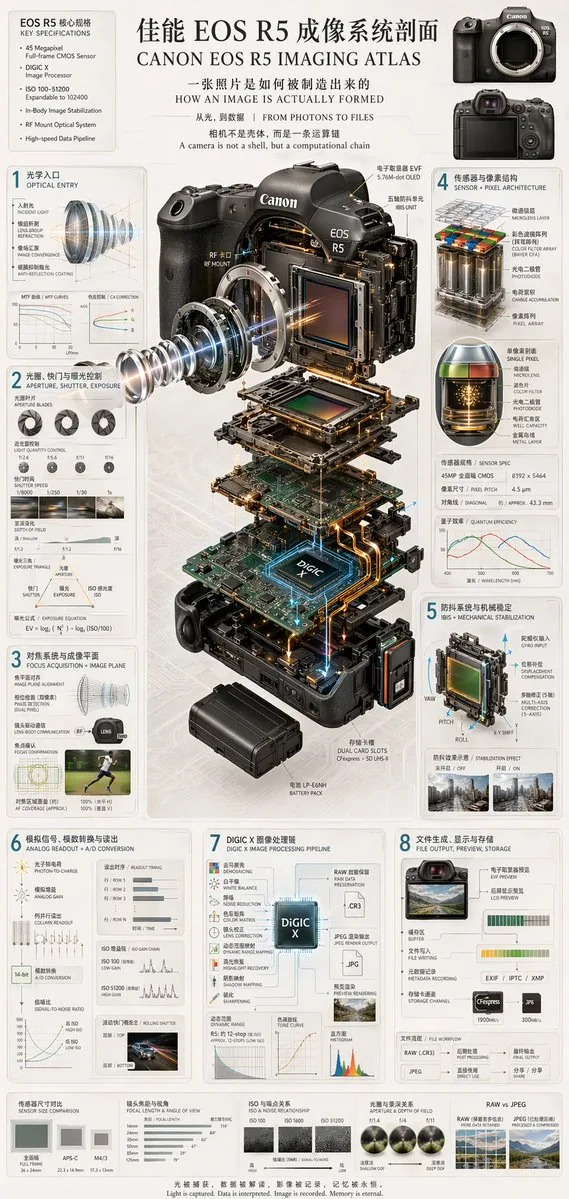
<role> Technical infographic designer </role> <context> Create a bilingual English/Chinese technical infographic and exploded-view diagram explaining how a camera forms an image. </context> <instructions> Create a clean, technical, highly detailed, photorealistic infographic with blueprint-style annotations, light gray background, and precise typography. Main title: [main title] Subtitles: - How an image is actually formed - From photons to files - A camera is a computational chain Include: - Top-left box: [camera model] key specifications with 6 bullet points. - Top-right: two front and back camera body views. - Center: detailed 3D exploded view of [camera model] with vertically separated components: lens mount, lens elements with glowing blue light rays, image sensor, motherboard with glowing [processor name] chip, battery pack, dual card slots, electronic viewfinder. Numbered sections: 1. Optical entry: lens cross-section with light rays and 2 line graphs. 2. Aperture, shutter, exposure: 3 aperture blade diagrams, 4 shutter speed example photos, depth-of-field diagram, exposure triangle diagram. 3. Focus acquisition + image plane: lens alignment diagram and AF coverage photo of a runner. 4. Sensor + pixel architecture: 3D pixel array diagram, single pixel cross-section diagram, sensor spec table, quantum efficiency graph. 5. IBIS + mechanical stabilization: sensor shift mechanism diagram with yaw/pitch/roll axes and 2 stabilization comparison photos. 6. Analog readout + A/D conversion: signal flowchart, 3 readout timing graphs, signal-to-noise ratio graph, rolling shutter example photo of a car. 7. [processor name] image processing pipeline: processing flowchart with central chip, dynamic range graph, tone curve graph, histogram. 8. File output, preview, storage: file output flowchart, 2 storage card icons, file workflow diagram. Bottom comparisons: sensor size comparison, focal length and angle of view, ISO and noise relationship, aperture and depth of field, RAW vs JPEG. Footer: [footer quote] </instructions> Generate the infographic.