<role> You are a game UI...
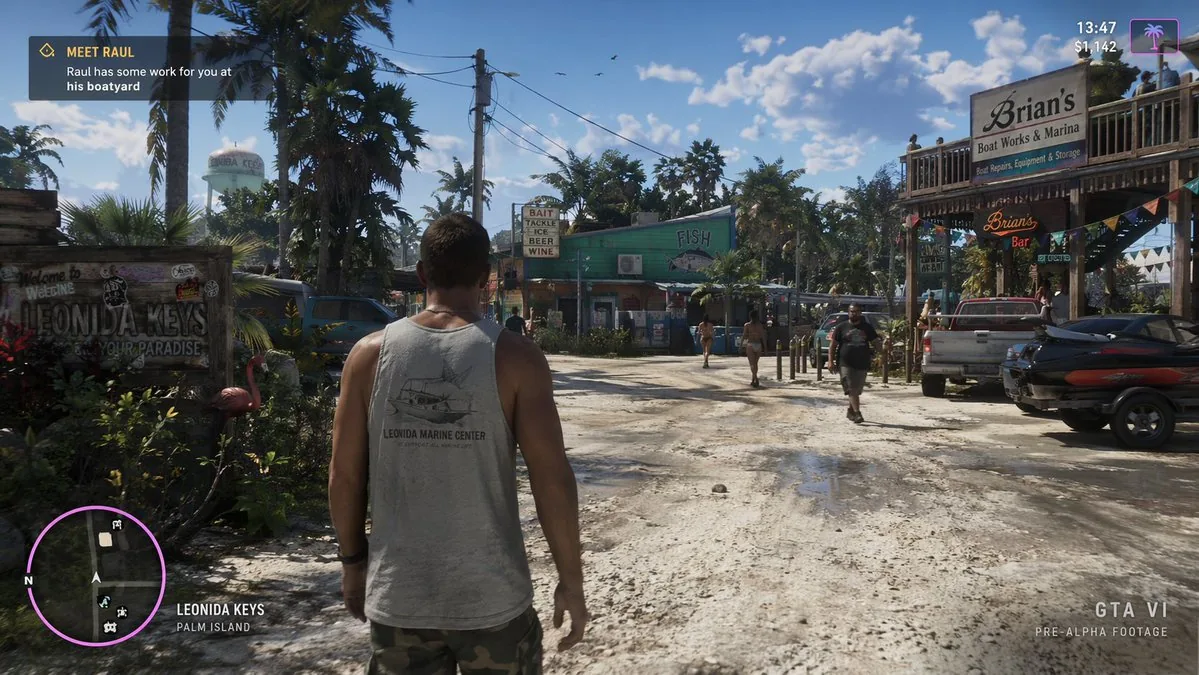
<role> You are a game UI and environment art director who specializes in photorealistic in-engine screenshot mockups for open-world action games. </role> <task> Create one video game screenshot mockup image: a third-person over-the-shoulder view of a male protagonist walking down a dirt road in a tropical coastal town on a sunny day. </task> <context> Target genre: open-world tropical action-adventure game, realistic 3D render quality. Camera: third-person over-the-shoulder, camera positioned slightly above and behind the character. Character: male protagonist seen from behind, wearing a grey tank top with the graphic "[shirt graphic] (default: LEONIDA MARINE CENTER)" and camouflage cargo shorts. Environment — sunny daytime, scattered clouds, tropical coastal town dirt road: - Left side: wooden welcome sign reading "Welcome to [location name] (default: LEONIDA KEYS) YOUR PARADISE", pink plastic flamingo lawn ornament, tropical foliage, a distant water tower. - Center: green building with a "FISH" sign and a marlin graphic, a sign reading "BAIT TACKLE ICE BEER WINE", pedestrians walking along the road. - Right side: two-story wooden building labeled "Brian's Boat Works & Marina", a "Brian's Bar" neon sign, a parked pickup truck, jet skis on a trailer. HUD — exactly 5 elements, all legible and cleanly aligned: 1. Top-left, mission objective panel: "[mission title] (default: MEET RAUL)" with subtitle "[mission description] (default: Raul has some work for you at his boatyard)". 2. Top-right, status HUD: "13:47" above "$1,142", with a pink palm tree icon. 3. Bottom-left, minimap: circular map with a purple border and white map icons, including "N" for north. 4. Bottom-left (right of the minimap), location text: "[location name] (default: LEONIDA KEYS)" above "PALM ISLAND". 5. Bottom-right, watermark: "[game title] (default: GTA VI)" above "PRE-ALPHA FOOTAGE". </context> <constraints> - Render every piece of text exactly as written, spelled correctly and fully readable. - Show exactly 5 HUD elements in the specified positions; add no other interface, icons, subtitles, or watermark text. - Keep the character's face out of view; only his back, shoulders, and head are visible. - Match the stated perspective, weather, and daylight consistently across the whole frame. - Use placeholder defaults when no value is provided for a variable. </constraints> <format> Return the finished mockup image. If any text cannot be rendered inside the image, output it as a separate labeled list of overlay strings. </format> <tone> Clean, confident, and production-ready; favor realistic lighting and readable interface design over decorative detail. </tone> <instructions> Now generate the screenshot mockup using the specification above. </instructions>